

Download Smartsupp – Live Chat, Free & Secure Customer Support Tool
Overview
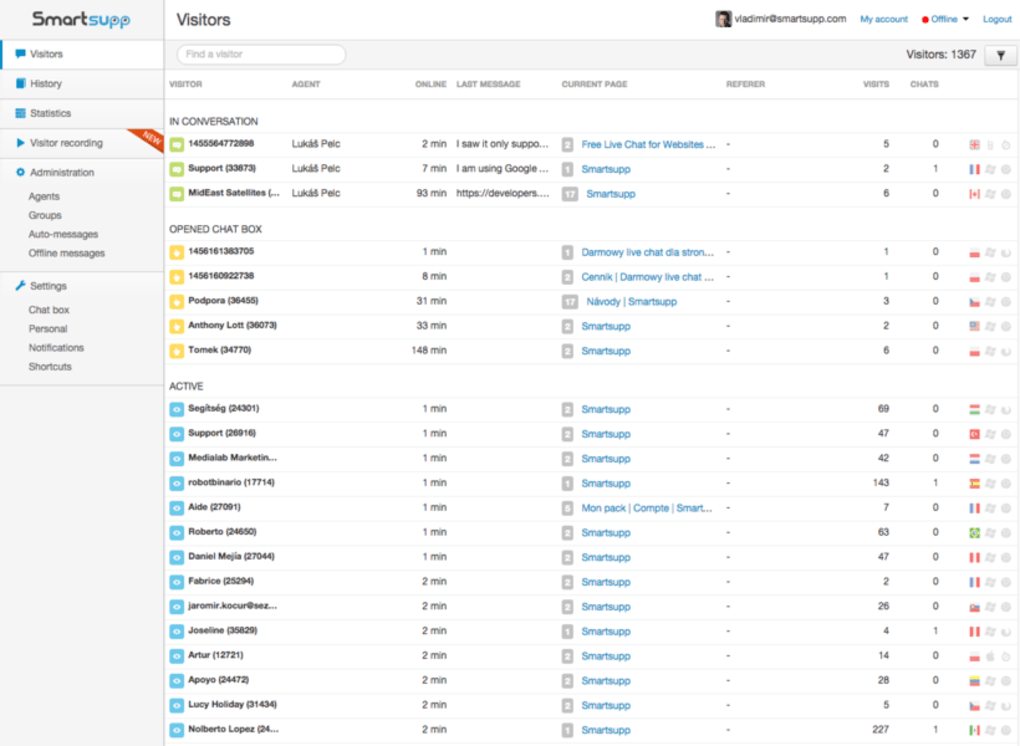
Smartsupp is a powerful live‑chat solution designed to turn website visitors into engaged customers without the need for complex setup or costly developers. With a clean, responsive chat widget that can be customized to match any brand’s colour palette, fonts, and logo, Smartsupp makes it easy to start conversations in real time. Whether you run an e‑commerce store, a SaaS platform, or a content‑rich blog, the tool lets you monitor visitor behaviour, capture leads, and answer questions from a desktop dashboard or a mobile device.
Smartsupp offers three pricing tiers – a generous free plan for small sites, and two premium packages that unlock advanced integrations such as Google Analytics, group statistics, and a full‑featured API. The combination of real‑time messaging, visitor tracking, and easy‑to‑use analytics helps businesses improve sales conversion rates, increase repeat purchases, and build lasting loyalty. Because the chat can be answered remotely, support teams can stay productive whether they’re at the office, working from home, or on the go with an Android or iOS smartphone.
Key Features That Set Smartsupp Apart
- Live Chat Widget: Fully responsive, customizable chat box that can be embedded on any page with a single line of code.
- Visitor Recording: Real‑time video replay of visitor sessions lets you see exactly what users are doing before they start a chat.
- Automated Greetings: Trigger personalized messages based on URL, time on page, or visitor behaviour.
- Mobile Apps: iOS and Android apps let you answer chats on the move, ensuring no lead is missed.
- Google Analytics Integration: Sync chat data with GA to see how conversations affect traffic, bounce rate, and conversions.
- Team Collaboration: Assign chats to specific agents, add internal notes, and view group statistics for performance tracking.
- API Access (Premium): Seamlessly connect Smartsupp with CRMs, ticketing systems, or custom dashboards.
- Multi‑Language Support: Translate the widget and pre‑written messages into dozens of languages.
- Security & GDPR Compliance: End‑to‑end encryption, data‑retention controls, and a clear privacy policy for European users.
- Free Plan: Unlimited chats, basic visitor info, and up to 100 chat histories stored for free.
Installation & Usage Instructions
Step‑by‑Step Setup
Getting Smartsupp up and running takes less than five minutes, even for non‑technical users:
- Create an Account: Visit the Smartsupp website, click “Sign Up,” and choose either the free plan or a premium tier.
- Verify Your Email: A confirmation link is sent to your inbox; click it to activate your account.
- Copy the Widget Code: After logging in, navigate to Settings > Installation. You’ll see a short JavaScript snippet.
- Paste the Code: Insert the snippet just before the closing
tag of your website’s HTML. For CMS platforms (WordPress, Shopify, Joomla) use the built‑in Smartsupp plugin or a header/footer injector. - Customize Appearance: In the dashboard, go to Design to adjust colours, fonts, and the welcome message so the widget blends with your branding.
- Set Up Automated Triggers: Use the “Automation” tab to define when a greeting should appear (e.g., after 30 seconds on product page).
- Start Chatting: Once live, you’ll see incoming messages in the web console or on the Smartsupp mobile app. Respond in real time, add notes, or assign the chat to another team member.
Best Practices for Efficient Use
To maximise the ROI of Smartsupp, consider the following tips:
- Pre‑write Common Answers: Create canned responses for FAQs (shipping, returns, pricing) to speed up reply times.
- Monitor Visitor Behaviour: Use the session replay feature to understand friction points before a chat is even initiated.
- Integrate with Your CRM: If you’re on a premium plan, push chat transcripts to your CRM so sales reps have full context before a follow‑up call.
- Set Availability Hours: Configure offline messages for times when your support team isn’t online, and include a link to a ticket form.
- Analyse Weekly Reports: Review the “Statistics” tab each week to see conversion rates, average response times, and agent performance.
Compatibility and System Requirements
Smartsupp is a web‑based application, which means it works across all modern browsers and operating systems. The chat widget itself is lightweight JavaScript that runs on any site that supports HTML5. Below is a quick compatibility matrix:
- Desktop Browsers: Chrome (latest), Firefox (latest), Edge, Safari, Opera – all fully supported.
- Mobile Browsers: Chrome for Android, Safari on iOS, Samsung Internet – chat widget adapts to touch screens without extra configuration.
- Operating Systems: Windows 10/11, macOS Monterey and later, Linux distributions with modern browsers, iOS 13+, Android 8+.
- Server Requirements: Since the widget is hosted on Smartsupp’s CDN, no server‑side installation is required. Your website just needs to serve HTTPS to keep the chat connection encrypted.
- Mobile Apps: Dedicated Smartsupp apps are available on the Apple App Store and Google Play Store, offering push notifications and offline chat queue handling.
Because Smartsupp runs entirely in the browser, you don’t need to worry about conflicting plugins or software dependencies. The only requirement is a stable internet connection for both the visitor and the support agent to ensure messages are delivered instantly.
Pros, Cons, and Frequently Asked Questions
Pros
- Free plan provides unlimited chats and essential visitor insights.
- Highly customizable widget matches any brand aesthetic.
- Visitor session recordings give deep context for support agents.
- Mobile apps keep you connected on Android and iOS.
- Seamless integration with Google Analytics and popular CRMs (premium).
- GDPR‑compliant data handling and end‑to‑end encryption.
Cons
- Advanced features (API, group statistics) are locked behind paid tiers.
- Reporting dashboard can feel overwhelming for beginners.
- Live chat widget loads an extra JavaScript file, which adds ~30 KB to page weight.
- Offline message handling requires manual setup of a fallback form.
FAQ – Answers to Common Queries
Is Smartsupp really free for unlimited chats?
Yes. The free plan allows unlimited simultaneous chats, basic visitor information, and up to 100 stored chat histories. Premium plans add advanced analytics, API access, and higher storage limits.
Can I integrate Smartsupp with my existing CRM?
Integration is possible through the Smartsupp API, which is available in the Business and Enterprise plans. Pre‑built connectors also exist for popular CRMs like HubSpot and Zoho.
How does Smartsupp handle GDPR compliance?
All chat data is encrypted in transit and at rest. Users can request data deletion, and the platform offers configurable consent banners to capture visitor permission before recording sessions.
Do I need any technical knowledge to install the widget?
No. Installation is a simple copy‑paste of a JavaScript snippet. For popular CMS platforms, Smartsupp also provides official plugins that add the widget with a few clicks.
What support channels are available for paid users?
Premium subscribers receive priority email support, live chat with the Smartsupp team, and access to a dedicated account manager for Enterprise customers.
Conclusion & Call to Action
Smartsupp delivers a robust, easy‑to‑deploy live‑chat experience that scales from a solo entrepreneur to a large support team. Its free tier is generous enough to test the core functionality, while the premium packages unlock powerful analytics and automation that can directly boost conversion rates. By combining real‑time messaging, visitor session recordings, and seamless mobile access, Smartsupp helps businesses respond faster, understand customer intent, and nurture loyalty—all without compromising security or privacy.
If you’re ready to start engaging visitors instantly, download Smartsupp today and install the widget in under five minutes. Whether you choose the free plan to get started or upgrade for deeper insights, the tool offers a secure, GDPR‑compliant way to turn website traffic into satisfied customers.
Smartsupp strikes an excellent balance between simplicity and powerful features. Its free version is more than adequate for small businesses, and the premium upgrades provide the analytics depth that growing teams need. The only drawback is the learning curve in the reporting dashboard, but the overall value is hard to beat.



.png)



